I Pointed 3 Static Scanners at an MCP Server That Fails 8 Auth Tests. They Found 0, Including Mine
Key takeaways
- mcpscan, Semgrep with 200 rules and Bandit all found 0 of the 8 authorization bugs in a deliberately naive MCP server.
- The three tools reported identical findings for the naive and the hardened server, so their output could not tell the two apart.
- Five custom Semgrep rules, about 40 lines of YAML, caught 3 of 8 bugs: no audience check, no issuer check and token read from the query string.
- Missing discovery headers and metadata, missing scope checks, anonymous tools/list and token passthrough only showed up in tests against a running server.
- mcpscan's auth-adjacent rule MCP012 checks client configuration, not how a server validates tokens.
In the previous post in this series I built a 10-test harness for the MCP 2026-07-28 authorization rules. A quickstart-style server passed 2 of them. A hardened version passed all 10.
That left an uncomfortable follow-up question. I maintain an MCP security scanner, mcpscan. If the naive server had shipped, would my scanner have stopped it? Would anyone’s?
So I ran three static scanners against both servers. They produced the same report for the broken one and the fixed one.
TL;DR
- I scanned an MCP server that fails 8 authorization tests with three static analysis tools: mcpscan (my own, 23 rules in v0.20), Semgrep (200 rules from the
p/python,p/jwtandp/security-auditpacks) and Bandit.- All three found 0 of the 8 auth bugs. They reported identical findings for the naive and the hardened server, so their output couldn’t tell the two apart.
- Five custom Semgrep rules, about 40 lines of YAML, caught 3 of 8 (no audience check, no issuer check, token read from the query string) with zero hits on the hardened server.
- The other five (missing discovery headers and metadata, missing scope checks, anonymous
tools/list, token passthrough) only showed up when a test talked to a running server.- Static scanners aren’t wrong here. They’re looking for a different class of bug. Auth for MCP servers needs runtime tests in CI, with a few static rules as a cheap early warning.
The setup
Both servers come from the auth harness. To keep the comparison clean, I split the original two-mode file into two single-mode copies, naive/server.py and hardened/server.py, so a scanner only ever sees one version. Then I re-ran the harness against each copy to make sure the split didn’t change behaviour: still 8 failed and 3 passed for naive, 11 passed for hardened (10 tests plus a control).
The eight failures the scanners had to find:
| # | Failure in the naive server | Spec level |
|---|---|---|
| 01 | 401 without WWW-Authenticate / resource_metadata | MUST (header or well-known URI) |
| 02 | No Protected Resource Metadata endpoint | MUST |
| 04 | No audience validation | MUST |
| 05 | No issuer validation | MUST (via OAuth 2.1) |
| 07 | No per-tool scope check | SHOULD |
| 08 | tools/list open to anonymous callers | SHOULD |
| 09 | Client token forwarded to the downstream API | MUST NOT |
| 10 | Token accepted from ?access_token= | MUST NOT (client rule) |
Some of these are as obvious in the source as a bug can be. The decode call literally says:
claims = jwt.decode(token, signing_key(token), algorithms=["RS256"],
                    options={"verify_aud": False})
The results
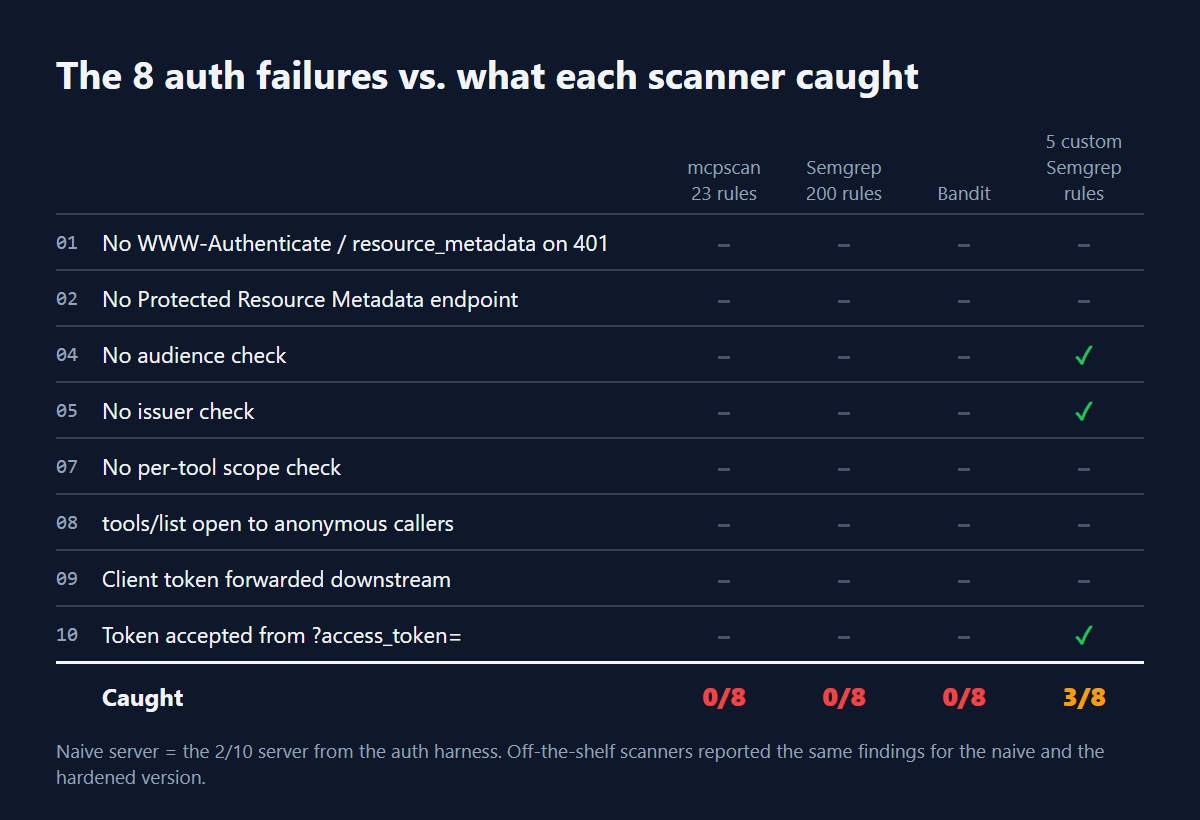
What each tool did report, for both servers:
- mcpscan: nothing. “Clean, no issues found.”
- Semgrep (200 rules run): one finding,
dynamic-urllib-use-detectedon the downstream call, becauseurllibsupportsfile://URLs. - Bandit: two findings: B310 on the same
urllibcall, and B105 “possible hardcoded password” on an empty string default.
None of those are about authorization, and all of them appear in the hardened server too. The verify_aud: False line above went unflagged by all three.
My own scanner deserves the most direct explanation. mcpscan’s auth-adjacent rule, MCP012, checks client configuration: a remote MCP server entry with no auth header, or a hardcoded bearer token. It looks at how you connect to a server, not at how a server validates tokens. That’s a real gap, and I’d rather find it with a harness than have someone find it in production.
Five rules that catch three bugs
Semgrep makes it cheap to encode a specific “never do this”. These two rules did most of the work:
rules:
  - id: jwt-audience-check-disabled
    languages: [python]
    severity: ERROR
    message: Audience validation disabled. MCP 2026-07-28 says servers MUST validate the token audience (RFC 8707).
    pattern: 'jwt.decode(..., options={..., "verify_aud": False, ...}, ...)'
  - id: jwt-decode-without-audience
    languages: [python]
    severity: ERROR
    message: jwt.decode() without audience= accepts tokens minted for other services.
    patterns:
      - pattern: jwt.decode(...)
      - pattern-not: jwt.decode(..., audience=$A, ...)
Add the same shape for issuer=, and one rule for $Q.get("access_token", ...), and you get this against the naive server:
access-token-from-query-string   line 73
jwt-audience-check-disabled      line 77
jwt-decode-without-audience      line 77
jwt-decode-without-issuer        line 77
Against the hardened server: zero findings. Four hits on the naive server cover three distinct bugs (04, 05 and 10).
The fifth rule was the one I most wanted to work: a taint rule from headers.get("Authorization") to a downstream add_header("Authorization", ...), which would catch token passthrough (09). It found nothing. In this server the token is read in one function, returned, and handed to a second function that makes the downstream call. My best guess is that this cross-function flow is beyond what the rule can follow in Semgrep’s open-source engine; I didn’t dig further. The runtime test caught it in one assertion.
Why the other five can’t be seen statically
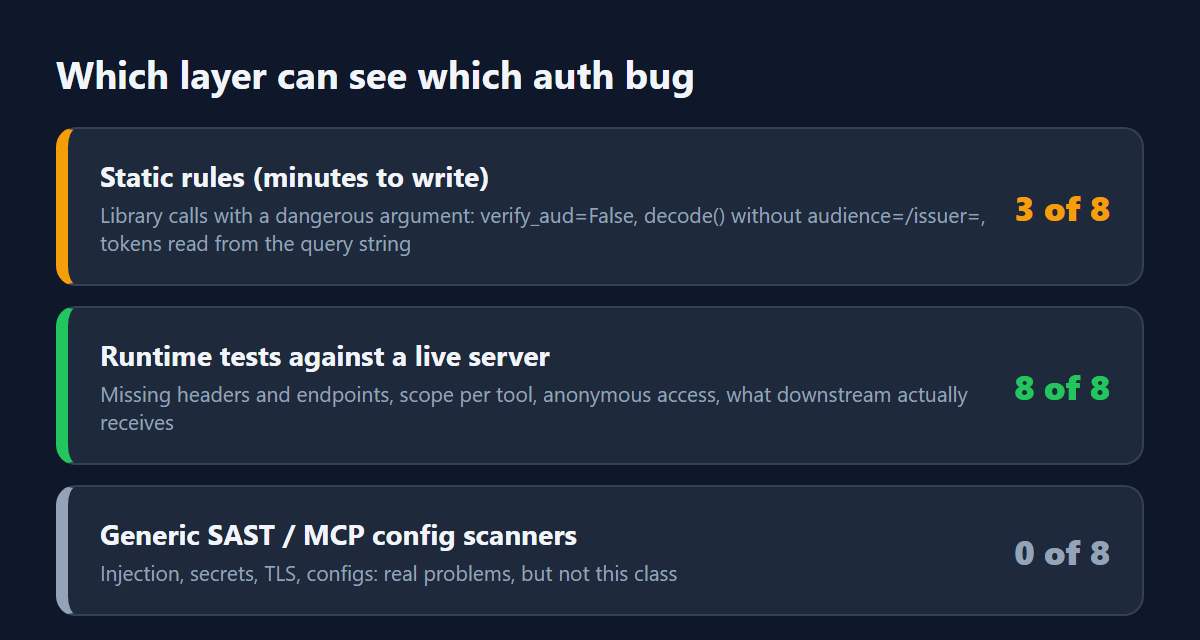
Look at what the remaining failures have in common:
- 01 and 02 are about something missing: a header that’s never set, an endpoint that doesn’t exist. Static rules find bad code much more easily than absent code.
- 07 and 08 depend on a mapping between tools and scopes, and on which methods your policy says are public. That’s business logic a generic rule can’t know.
- 09 is a data flow across functions, which is hard for pattern-based tools by design.
A runtime test doesn’t care how the code is written. It sends a request and checks the response, or checks what the fake downstream received. That’s why the harness caught 8 of 8 and the scanners caught 0.
What I’d put in CI
- The runtime harness, on every pull request that touches the server. Ten tests ran in about 3 seconds here.
- A handful of custom static rules for the patterns you never want to see:
verify_aud: False,decode()withoutaudience=, tokens from query strings. They fail fast, before anything starts. - Your general scanners as well. Semgrep and Bandit flagged a real hardening point (the
urllibscheme), and mcpscan covers configuration and supply-chain risks the harness doesn’t. They just aren’t an auth test.
And on my side: mcpscan needs server-side auth rules. The two Semgrep patterns above are the obvious starting point.
Caveats
- One server, written by me. The naive baseline is deliberately typical, not a sample of real-world servers.
- Three scanners, default or common rule packs, in Python. Commercial SAST tools, Semgrep Pro’s cross-file analysis, or other languages may do better, especially on the passthrough case.
- mcpscan is my project, so treat my explanation of its scope as the author’s view. The scan output itself is unedited.
Update: I fixed mine
A scanner that misses all eight is a roadmap, so I wrote the rules. mcpscan now ships seven server-side authorization rules, MCP024 to MCP030, built on the Python AST rather than regex. Same naive server, same command:
| # | Failure | Before | After | Rule |
|---|---|---|---|---|
| 01 | 401 without resource_metadata | no | yes | MCP027 |
| 02 | No Protected Resource Metadata endpoint | no | yes | MCP028 |
| 04 | No audience check | no | yes | MCP025 |
| 05 | No issuer check | no | yes | MCP026 |
| 07 | No per-tool scope check | no | no | runtime only |
| 08 | Anonymous tools/list | no | no | runtime only |
| 09 | Token passthrough | no | yes | MCP029 |
| 10 | Token from ?access_token= | no | yes | MCP030 |
0 of 8 became 6 of 8, with 0 findings on the hardened server. MCP024 also flags jwt.decode with signature verification turned off. I ran the new rules over fastmcp, the official mcp SDK, LiteLLM and seven other MCP projects to hunt for false positives; the two causes I found are fixed and covered by tests. Scope checks and anonymous listing stay runtime-only for the reasons above, so the harness still earns its place in CI.
The rules are on the mcpscan main branch.
The takeaway
A clean scanner report means the scanner found nothing in its own rule set. These three tools ran hundreds of rules and gave the same verdict on a server that fails eight authorization tests and on one that passes them all. Test MCP auth the way an attacker would hit it, against a running server, and add static rules for the mistakes you never want to see.
Has your scanner ever given a clean report on a bug you later found by hand?
Frequently asked questions
- Can static scanners find MCP authorization bugs?
- In this test, no. mcpscan, Semgrep with 200 rules and Bandit found 0 of 8, and custom Semgrep rules caught 3 of 8, the ones visible as bad code such as verify_aud set to False.
- Why can't static rules see the other five failures?
- Two are about something missing, such as an unset header or absent endpoint, two depend on business logic about tools and scopes, and token passthrough is a cross-function data flow.
- What should go in CI for MCP server auth?
- The runtime test harness on every pull request that touches the server, a few custom static rules for patterns you never want, and your general scanners as well.
- Why did mcpscan find nothing?
- Its rule MCP012 checks how you connect to a server, such as a missing auth header or hardcoded bearer token, not how a server validates tokens.
About the author

Security Engineer & Technical Writer
Security engineer and technical writer based in Batam, Indonesia. I review and harden MCP servers and AI agents, build security automation, and write up what holds and what fails. I also train on DNS security as a PANDI .id Academy trainer.
Related articles
-
14 min read
MCP Security: A Practitioner's Guide
MCP security guide: trust boundaries, eight attack classes from tool poisoning to unauthenticated servers, a defense checklist, and how to scan with mcpscan.
- MCP Security
- AI Security
-
7 min read
No CVE needed: how a GitHub issue hijacked an AI agent
In a demo, one GitHub issue hijacked an AI agent via the GitHub MCP server and leaked private repo data. Why it needs no CVE, and what I changed.
- AI Security
- MCP Security
-
3 min read
A fake MCP server spent three months earning trust. The tells were there
A fake MCP server from SmartLoader earned trust for three months. See which signals attackers can farm, which are costly to fake, and a pre-install checklist.
- MCP Security
- AI Security
All writing | RSS | Markdown