A fake MCP server spent three months earning trust. The tells were there
Key takeaways
- SmartLoader spent three months building five GitHub accounts with AI generated personas and cross forked repos around a trojanized Oura Ring MCP server, then submitted it to a legitimate MCP market registry.
- Stars, commits and community activity were farmed on purpose, while real issue history with back and forth threads is expensive to fake.
- Check for a company that exists outside GitHub, and treat the same five accounts appearing across several supposedly different projects as a red flag.
- Compare permissions requested against purpose, since a ring sleep tracker does not need shell access.
- Do the first run of an unknown MCP server in a container with no credentials and an egress watch, and stop if it phones home somewhere unexplained.
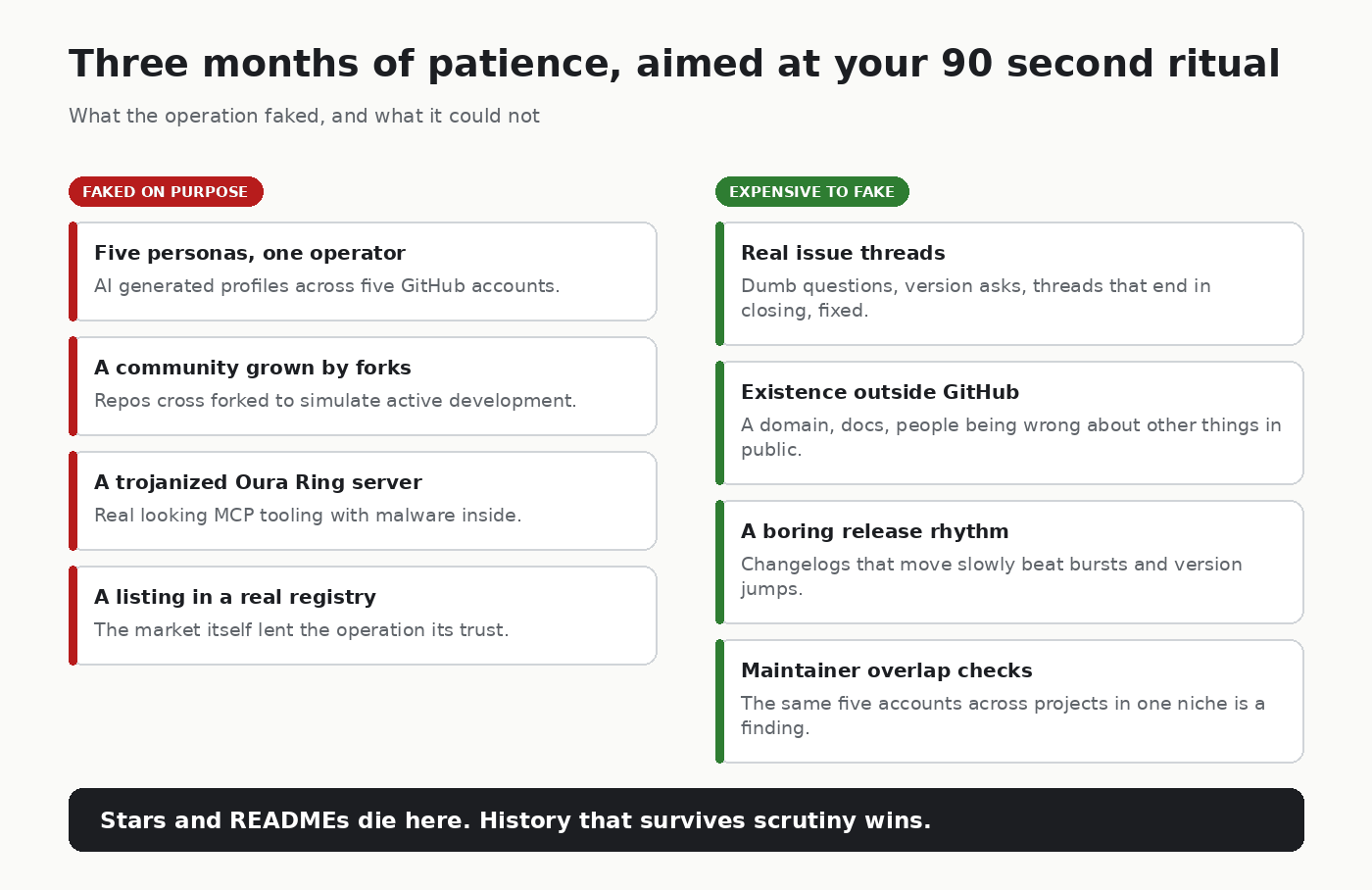
In February, researchers at Straiker STAR Labs documented a supply chain operation that should reset how you vet MCP servers. A malware operation known as SmartLoader spent three months constructing a fake developer ecosystem: five GitHub accounts with AI generated personas, repos cross forked to simulate an active community, all wrapped around a trojanized Oura Ring MCP server. Then it was submitted to a legitimate MCP market registry.
Three months of patience. Fake commit history, fake people, fake social proof. The old advice, check the GitHub profile, check the stars, dies exactly here. Every signal on that page was farmed on purpose.
Why this works on developers
We pattern match fast. Active community, reasonable README, commits flowing in: install. The whole vetting ritual takes ninety seconds and predators know the ritual. The fake ecosystem was built to pass the ritual, not to survive scrutiny.
What is still hard to fake
Deep fakes of activity are cheap. Sustained, specific, boring history is expensive. These tells survived the operation and they survive the next one:
- Issue history with real back and forth. Real projects have dumb questions, maintainers asking for versions, and threads that end in “closing, fixed in X”. Farmed repos have quiet issue tabs or drive-by star activity.
- A company that exists outside GitHub. Domain, docs site, people you can find being wrong about other things in public. Personas that only exist inside one repo graph are a finding.
- Release rhythm versus commit noise. Real projects have boring changelogs. Farmed ones have bursts, version jumps, or commits that describe nothing you can verify.
- Maintainer overlap. If the same five accounts appear across several “different” projects in the same niche, you are looking at a company of ghosts.
- The install count provenance. Big numbers with no corresponding ecosystem, no blog posts, no issues mentioning the project anywhere else, are decoration.
The vetting checklist I run now
Before any MCP server goes into a config I care about:
- Who is behind it, verifiable outside the repo
- Issue quality over issue count
- Changelog realism
- Permissions requested versus purpose. A ring sleep tracker does not need shell access
- First run in a container with no credentials and an egress watch. If it phones home to somewhere unexplained, done
- Config scan for secrets handling and risky patterns. I use my own scanner for this, any equivalent works
The registry is not your threat model. Registries will tighten, add review queues, maybe attestation. Attackers will adapt, the same way they adapted to app stores. The install decision stays yours.
The browser extension ecosystem went through this exact era. We know how it went. The developers who internalized “the marketplace listing proves nothing” were the ones who stayed out of the incident reports.
I publish pieces like this on MCP and AI-agent security regularly, so bookmark if you’d rather not lose it in your feed.
Sources
- UpGuard writeup of the Oura Ring operation and five other incidents: https://www.upguard.com/blog/mcp-security-incidents
- CSA research note on systemic MCP exposure: https://labs.cloudsecurityalliance.org/research/csa-research-note-mcp-security-crisis-20260504-csa-styled/
If you want to run checks like these on an MCP server or a .claude/ directory before you install it, I maintain mcpscan, an open-source scanner for tool poisoning, risky permissions and leaked secrets. Issues and false-positive reports are welcome.
Originally published on DEV. Discussion happens there.
Frequently asked questions
- How do I tell if an MCP server on a registry is fake?
- Look at things that are costly to fake: issue threads with real back and forth, a company or domain outside GitHub, a boring release rhythm, and whether the same accounts appear across several projects in the same niche.
- What was the SmartLoader MCP server attack?
- Straiker STAR Labs documented SmartLoader building a fake developer ecosystem over three months, with five GitHub accounts and cross forked repos, around a trojanized Oura Ring MCP server submitted to a legitimate MCP market registry.
- How should I test a new MCP server safely before installing it?
- Run it first in a container with no credentials and watch egress. If it phones home to somewhere unexplained, do not install it.
About the author
Security Engineer & Technical Writer
Security engineer and technical writer based in Batam, Indonesia. I review and harden MCP servers and AI agents, build security automation, and write up what holds and what fails. I also train on DNS security as a PANDI .id Academy trainer.
Related articles
-
7 min read
No CVE needed: how a GitHub issue hijacked an AI agent
In a demo, one GitHub issue hijacked an AI agent via the GitHub MCP server and leaked private repo data. Why it needs no CVE, and what I changed.
- AI Security
- MCP Security
-
6 min read
What Is MCP Security? Common Attacks and How to Scan Your MCP Servers
What is MCP security? Four attacks found testing 11 MCP servers: tool poisoning, command injection, path traversal, planted prompts, and how to scan for them.
- MCP Security
- AI Security
-
3 min read
The NSA published 17 pages on MCP security. Here it is as a checklist you can run today
The NSA's 17-page MCP security guidance as seven checks you can run today: inventory, pinning, tool descriptions, sessions, privileges, egress, logs.
- MCP Security
- AI Security
All writing | RSS | Markdown